Buy tokens
If the tokens from your package aren’t enough for checks, parsing or AI, you can buy more at any time.
Buy
- In the dashboard header, click your token balance — the lightning icon.
- Choose how many tokens to buy — with a ready preset or the “−” and “+” buttons. The current balance is at the top, the price per token below, and the total on the button. Click Continue.
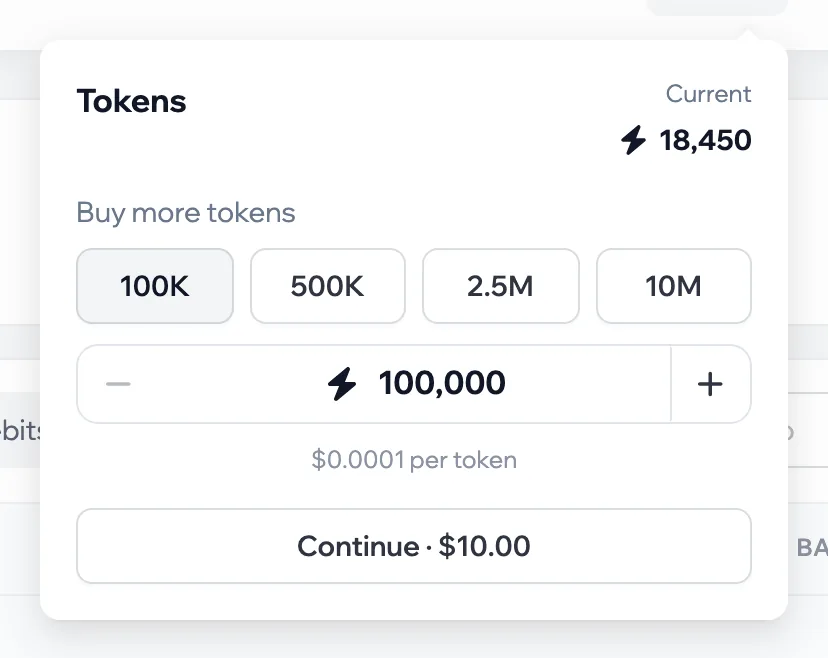
- Confirm and pay — from the wallet or by card. The tokens are added automatically, and the bell shows a “Tokens added” notification.
When you can’t buy
- Without an account package: tokens are bought on top of a package. The window offers to buy accounts first.
- While the package is in its grace period: renew the package first.
When tokens expire
Purchased tokens add up with the ones that came with the package and accumulate while the package is paid. If the package isn’t renewed and the grace period has ended, the remaining balance expires — the wallet history shows an “Expired with the subscription” operation.