Share with colleagues
A colleague can view a campaign and handle its conversations from their own dashboard login. Access is given through an invite link, and you approve each request.
Invite
- In the campaign’s Settings, in the Shared access block, turn on the invite link and click Copy.
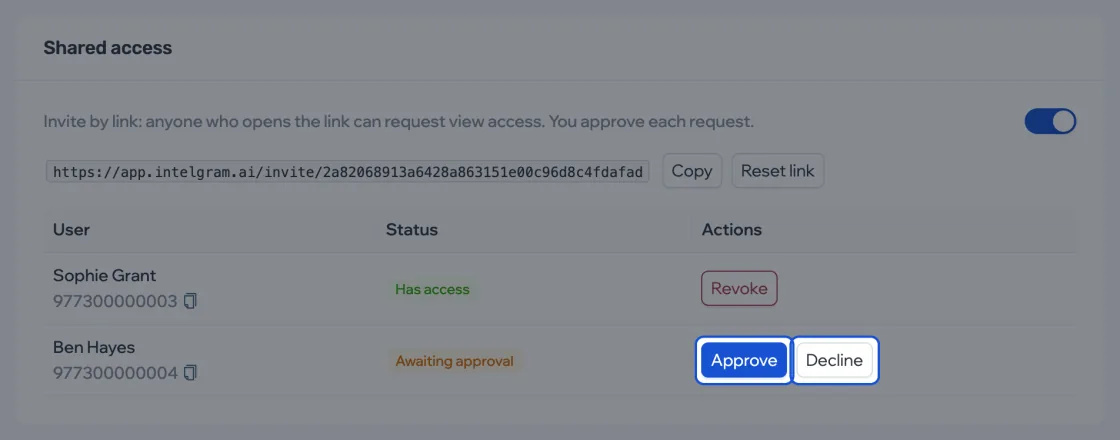
- Send the link to your colleague. They open it while signed in to their dashboard and click Request access. Your colleague doesn’t need their own package — choosing a country on first sign-in is enough.
- You get a notification about the request. In the table, the colleague’s status is “Awaiting approval” — click Approve or Decline.
An approved colleague gets the “Has access” status, and the campaign appears in their list. On the invite page they now see an Open campaign button. Revoke closes access. A campaign can have up to 15 colleagues, counting requests that are still waiting for an answer.
If the link went to the wrong person, click Reset link — the old one stops working. You can reset it several times a day. Turning the switch off also closes the link, and when you turn it back on, the same link works again. The switch doesn’t affect requests or access already given.
What a colleague sees
For a colleague, the campaign opens in view mode: instead of the start and pause buttons there’s a “View mode” label.

| Can | Can’t |
|---|---|
| View the campaign’s overview, summary and audience | Start, pause or stop it |
| Read dialogs and write by hand | Change the script, list, schedule or accounts |
| Set and remove conversions | See the script’s texts |
In Settings, a colleague has only two things: their own notifications and Leave campaign. After leaving, the campaign disappears from their list; this doesn’t affect the outreach. They can come back only through a new invite.