Follow up on silence
The Scheduled branch sends a reminder to people who didn’t reply and closes dialogs where the silence has gone on too long.
How Scheduled works
Once an hour the branch runs for every open dialog in the campaign — only within the campaign’s schedule window. When to remind and what to say is decided by the branch itself, with conditions.
The branch doesn’t run if the campaign is stopped, the dialog is finished or switched to manual mode, the person has blocked you, or the conversation has been silent for more than a month. While a campaign is paused, follow-ups continue — a pause only stops new dialogs.
Remind once
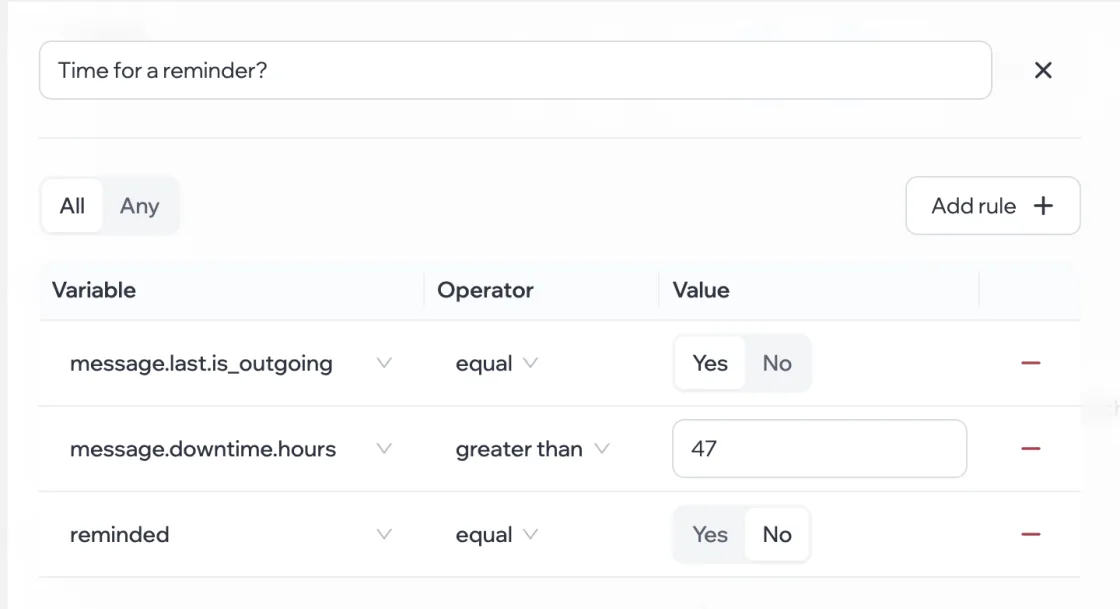
- After Scheduled, add a Condition: you wrote last, the silence is longer than 47 hours, and you haven’t reminded yet.
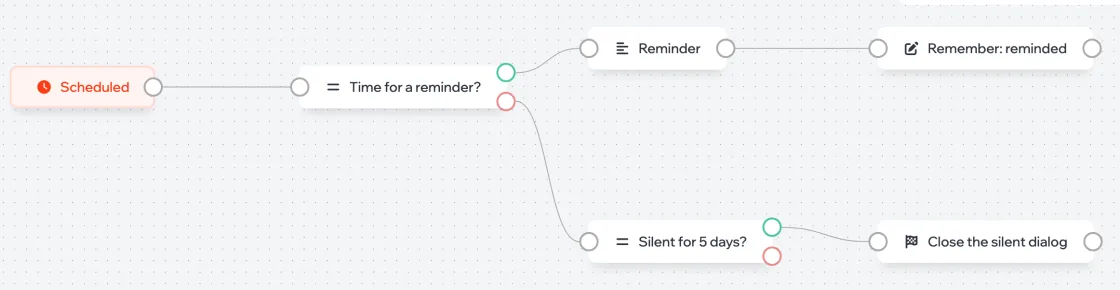
- On the “met” output, add a reminder message and a Set variable block with “reminded” = yes, so it doesn’t repeat.
Create the “reminded” variable in advance: Settings › Variables, type Yes/No, default No. More in Variables and conditions.
Close a silent dialog
A second condition — already reminded and silent for more than 120 hours — leads to Finish dialog. The campaign doesn’t write to this person again.